
How Ableton Automation and Click Cues Elevate Modern Concerts
- Laurence Sorbello

- Jul 23
- 9 min read
A great concert feels loose, alive and human. Behind that feeling, the best modern shows are often running on tight systems: click cues, in-ear monitoring, automation, lighting triggers and video switching that all work together.
That does not make the performance less real. It gives the band more freedom to perform with confidence.
For a growing act like the Barnyard Band, this is the difference between playing the gig in front of them and preparing for the stages they want next. If the goal is to reach the stars, the show has to be built like it belongs there before the arena booking arrives.
Modern concert production is no longer only for stadium acts. With Ableton Live, a reliable playback rig and smart planning, bands can bring major-tour discipline to local venues, festival stages and theatre shows.

The best modern shows run on more than talent
A band can be excellent and still have moments where the show drifts.
The tempo might push during a chorus. A lighting cue might land half a second late. The drummer might count in while the keyboard player is still changing patches. A big crowd participation moment might arrive, but the lights do not hit until after the audience has already responded.
On a small stage, these moments can feel charming. On a larger stage, they can feel messy.
Big touring acts solve this by treating the concert like a performance system. The musicians still play. The singer still leads the room. The drummer still drives the energy. But the show has a hidden backbone that keeps everyone locked together.
That backbone often includes:
A click track for tempo
Spoken cue tracks for structure
In-ear monitoring for clarity
Backing tracks where needed
MIDI or timecode for lighting and video
Automated patch changes for instruments and effects
A show file that follows the set from song to song
This is where Ableton Live becomes more than a music production tool. It becomes the central nervous system of the show.
Ableton gives the band a reliable centre
Ableton Live is widely used because it is flexible. It can handle stems, click tracks, cue tracks, MIDI commands and song arrangements in one session. For live work, that matters.
A well-built Ableton show file can keep the band moving from one section to the next without confusion. It can send a click to the drummer, spoken cues to the in-ears and backing tracks to front of house. It can also send triggers to lighting consoles, video systems or guitar and keyboard rigs.
That kind of setup is not about replacing musicians. It is about removing uncertainty.
When Ableton Integration into live shows is done properly, the band gets a clear map of the performance while the audience only feels the result. Songs start cleanly. Transitions feel intentional. Lighting hits with the music. Video content supports the moment rather than lagging behind it.
A simple Ableton live set might include:
Element | What it does | Who benefits |
Click track | Keeps tempo consistent | Drummer, band, lighting and video teams |
Cue track | Gives spoken prompts like “chorus”, “bridge” or “stop” | Musicians and playback operator |
Backing stems | Adds parts that cannot be played live | The overall sound and arrangement |
MIDI triggers | Sends commands to other gear | Lighting, video, keyboards and effects |
Scene markers | Organises songs and sections | Playback operator and musical director |
The key is discipline. Ableton should not become a fragile laptop full of random tracks and hope. It needs a clear show file, proper routing, tested hardware and a backup plan.
Click cues keep the whole band in time
A click track is one of the simplest tools in modern live music, but it changes everything.
The drummer usually hears the click in their in-ear monitors. Other players may hear it too, depending on the band. The audience does not hear it. To them, the band simply sounds tight.
Click cues take this further. A cue track uses spoken prompts to guide the band through the song. It might say:
“Intro, two, three, four”
“Verse”
“Chorus”
“Breakdown”
“Drum solo”
“Big ending”
These cues are especially useful when arrangements are complex, medleys move quickly or the show includes lighting and video moments that need exact timing.
For the Barnyard Band, this can be a major step up. Instead of relying on looks across the stage, shouted counts or memory under pressure, everyone hears the same direction at the same time.
That matters on bigger stages. When musicians are spread across several metres, stage volume can make timing strange. Sound travels. Wedges can blur. Crowd noise can swallow details. In-ear monitoring and click cues bring the band back into one shared clock.
The goal is not to make the band stiff. A good click setup should support feel, not crush it. The click can be used only where needed. Some songs might run fully locked, while others stay open and organic. The band decides where precision helps and where a looser feel serves the music better.
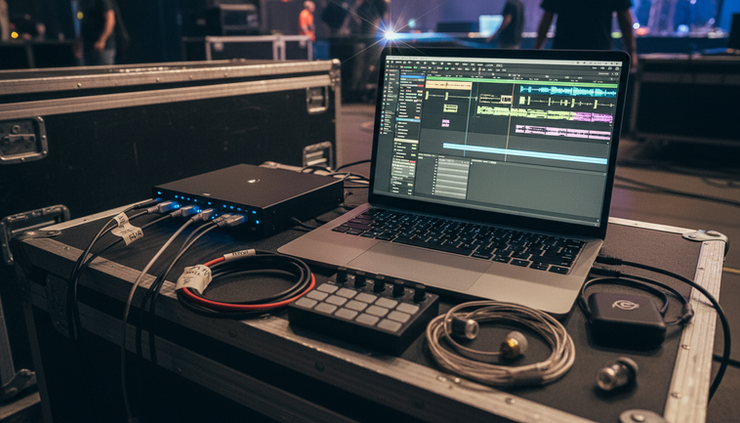
In-ear monitoring turns chaos into clarity
On a loud stage, musicians often hear a strange version of the show. The guitar amp is blasting from one side. Cymbals are washing over everything. The bass might be huge in one spot and missing in another.
In-ear monitoring fixes much of that.
With in-ears, each player can hear a tailored mix. The drummer gets click, kick, bass and cues. The vocalist gets pitch references and their own voice. The keyboard player gets click, vocal, drums and enough of the track to stay locked. Everyone gets what they need, not just whatever happens to be loudest nearby.
This is one reason large acts depend on in-ears. The bigger the stage, the harder it is to rely on natural stage sound. In-ears keep the performance connected, even when the musicians are far apart.
For a band moving toward more ambitious shows, in-ears also make automation safer. If lighting, video and tracks are built around exact moments, the musicians need to hear those moments clearly. A click that disappears in the noise is useless. A cue that only some players hear can create confusion.
A strong in-ear setup can include:
A consistent stereo mix for each musician
Click sent only to the people who need it
Cue track separated from audience-facing audio
Ambient microphones so the band still feels the room
A talkback mic for quick communication between songs
The last point matters. Technology should not isolate the band from the audience. Ambient mics can bring crowd energy back into the in-ears, so the musicians still feel the roar, the claps and the singalong moments.
Lighting automation makes the show feel bigger
Lighting is one of the clearest ways automation improves a concert.
When a chorus lands, the lights can open wide. When the band drops to a quiet bridge, the stage can narrow to a single colour. When the singer asks the crowd to clap, blinders can hit the audience at exactly the right time.
These moments feel powerful because they are timed.
Manual lighting can still be excellent, especially with a skilled operator. But automation gives the show consistency. If a song has a huge stop after bar 32, the blackout can happen on that exact beat every night. If the crowd participation section needs blinders, strobes or colour hits, those cues can fire from the same Ableton timeline that the band is following.
That does not remove the lighting designer’s creativity. It protects it.
The designer can build the looks in advance, then the playback system can help trigger them at the right time. The operator can still respond to the room, adjust intensity and handle unexpected changes. Automation handles the repeatable moments. Humans handle the feel.
For a band like Barnyard Band, this is the “dress for the concerts it wants” mindset. Even in a smaller venue, the show can be built with arena habits:
Songs have planned visual moments
Audience interaction has lighting support
Solos get focus instead of being left in the dark
Transitions are lit with purpose
Endings look finished, not accidental
The result is a show that feels more complete.

Video switching can follow the music automatically
Large backdrop screens are now a major part of concert storytelling. They can show graphics, lyrics, live camera feeds or close-ups of the musicians.
The challenge is timing. A drummer starts a solo, but the screen stays on a wide shot. The keyboard player plays a feature line, but the audience sees the singer waiting for the next verse. The guitarist steps forward, but the camera switch arrives late.
Automation can help here too.
With the right show control setup, Ableton can send triggers that tell a video switcher or media server when to change shots. The playback file reaches the drum solo, then a command fires and the big screen cuts to the drummer. The keys feature arrives, and the screen switches to a camera looking down the keyboard. The final chorus hits, and the backdrop returns to full-stage energy.
This kind of production makes a venue feel larger. It also helps the audience follow the arrangement. When someone is playing the featured part, the screen can point attention there.
For the Barnyard Band, this is a smart way to think beyond the current stage. A huge LED wall might not be part of every show yet, but the concepts can be prepared now. Camera cues, solo sections and visual focus can all be planned in the arrangement.
A simple video automation plan might look like this:
Song moment | Screen content | Trigger source |
Intro | Logo-free motion background | Ableton scene start |
First verse | Wide live camera shot | Timeline cue |
Drum solo | Drummer close-up | MIDI trigger |
Keyboard feature | Down-the-keys camera shot | MIDI trigger |
Final chorus | Full band and crowd shots | Timeline cue |
The audience may never know the switch was automated. They only know the show felt polished.
Automation should serve the performance, not control it
There is a reasonable fear around concert automation. Some musicians worry that click tracks and playback systems make the show too rigid.
That can happen if the setup is built badly.
A band should not feel trapped by its own technology. The system needs escape routes. Songs may need vamp sections that can extend. The singer may want space to talk to the crowd. The drummer may want to hold a final hit. A technical issue may force the band to continue without tracks.
Good show design allows for that.
Ableton sessions can be built with flexible sections. The playback operator can launch the next scene when the band is ready. Certain songs can remain free of click. Some moments can use manual lighting instead of automation. The band can decide which parts need strict timing and which parts should breathe.
The best modern concert systems support three things:
Consistency
The show lands well every night, even when the room, stage and pressure change.
Confidence
Musicians know where they are, what is coming next and how the production will respond.
Emotion
The audience still feels a real band making real choices in front of them.
If the technology does not support those three things, it needs to be simplified.
Building a star-level show starts before the star-level stage
A band does not need a stadium budget to start thinking like a stadium act.
The first step might be a click track on two songs. Then cue tracks. Then in-ear monitoring. Then a simple lighting trigger for one big moment. Later, the system can grow into full-set automation, video switching and more advanced playback redundancy.
The smart path is gradual. Each new layer should be tested in rehearsal before it reaches the stage.
A practical growth plan could be:
Start with tempo
Put the drummer on click for selected songs that need tight timing.
Add spoken cues
Use cues for tricky arrangements, stops, solos and transitions.
Move to in-ear monitoring
Give each player a clear mix and keep click away from the audience feed.
Build a clean Ableton show file
Organise songs, tracks, routing and markers so the system is easy to run.
Trigger one production element
Start with a lighting cue, intro track or video change that has clear value.
Rehearse failures
Practise what happens if the laptop stops, a cue is missed or a track is muted.
That last point is not negative thinking. It is professional thinking. Big shows have backups because live performance always carries risk. Preparing for problems lets the band stay calm if something goes wrong.

The flow of the concert is the real upgrade
The biggest benefit of Ableton automation is not that the band sounds more mechanical. It is that the concert flows better.
There is less dead air between songs. The intro starts when it should. The lighting supports the emotional shape of the set. The screen shows the right player at the right time. The band hears the same cues. The audience experiences a show that feels intentional from the first note to the last.
That is the standard set by major touring artists. They use click cues, in-ear monitoring and show control because large stages leave no room for guesswork. The same thinking can help any serious band grow.
For the Barnyard Band, dressing for the concerts it wants means building the habits now: tight timing, clear communication, planned visual moments and a system that can scale. The stars are not reached in one jump. They are reached by making the next show feel more complete than the last.


Comments